



Threat Intelligence
Check IP addresses, domains, URLs and files against the threat intelligence behind Threat Blocker and Cloud Defender, in Cyber Console or from your applications through the API.
How it works
Reports from more than 130 sources give every indicator a crime score. You look it up in Cyber Console or from your own applications through the API, while Threat Blocker and Cloud Defender receive the list of IP addresses to block.
-
1
Lookups in Cyber Console
One field for IP addresses, domains, URLs and file digests. For every indicator, the crime score with its level and the reports; for an IP, also network, country, MITRE ATT&CK techniques and the PDF report.
-
2
The same lookups through the API
With a token generated from your profile, your tools query the same threat intelligence. The documentation is public on docs.aegister.com, and your profile shows API use day by day.
-
3
The same intelligence that blocks
Threat Blocker and Cloud Defender block the listed IP addresses, with the list updated at least once an hour. A lookup, instead, reads and shows: it blocks nothing.
The console in action
A tour of the console, then tasks from start to finish, on the screens you will use. Each recording is split into chapters: pick one to start from there.
What a lookup shows
A single field recognises on its own whether you are looking up an IP address, a domain, a URL or a file digest. A lookup reads and shows: blocking IP addresses is the job of Threat Blocker and Cloud Defender.
Crime score and level
Every result gives the crime score on a five-level scale, from no risk to critical, with the number of reports and the dates of the first and the last.
The full picture of an IP address
For an IP, also network and country, the score over time, why it was reported, the MITRE ATT&CK techniques with their defences and the STIX indicators to download.
PDF report
The full picture of an IP address downloads as a PDF, to attach to an analysis or an internal report.
Your files stay with you
To check a file, drop it on the page: its SHA-256 digest is computed in the browser and the file is not uploaded.
API with tokens
Each user generates their own tokens from the profile and sees API use day by day; we set the daily limits. The documentation is public on docs.aegister.com.
Threat intelligence for your company
Lookups are enabled with a licence for each kind of indicator: IP addresses, URLs, domains and files. The Cyber Check-up shows you where to start.
Delivered through Cyber Console
Threat Intelligence is in the Perimeter Protection module of Cyber Console, next to Threat Blocker, Cloud Defender and Log Analysis: the same platform we use to manage controls, incidents and documentation.
Explore the platform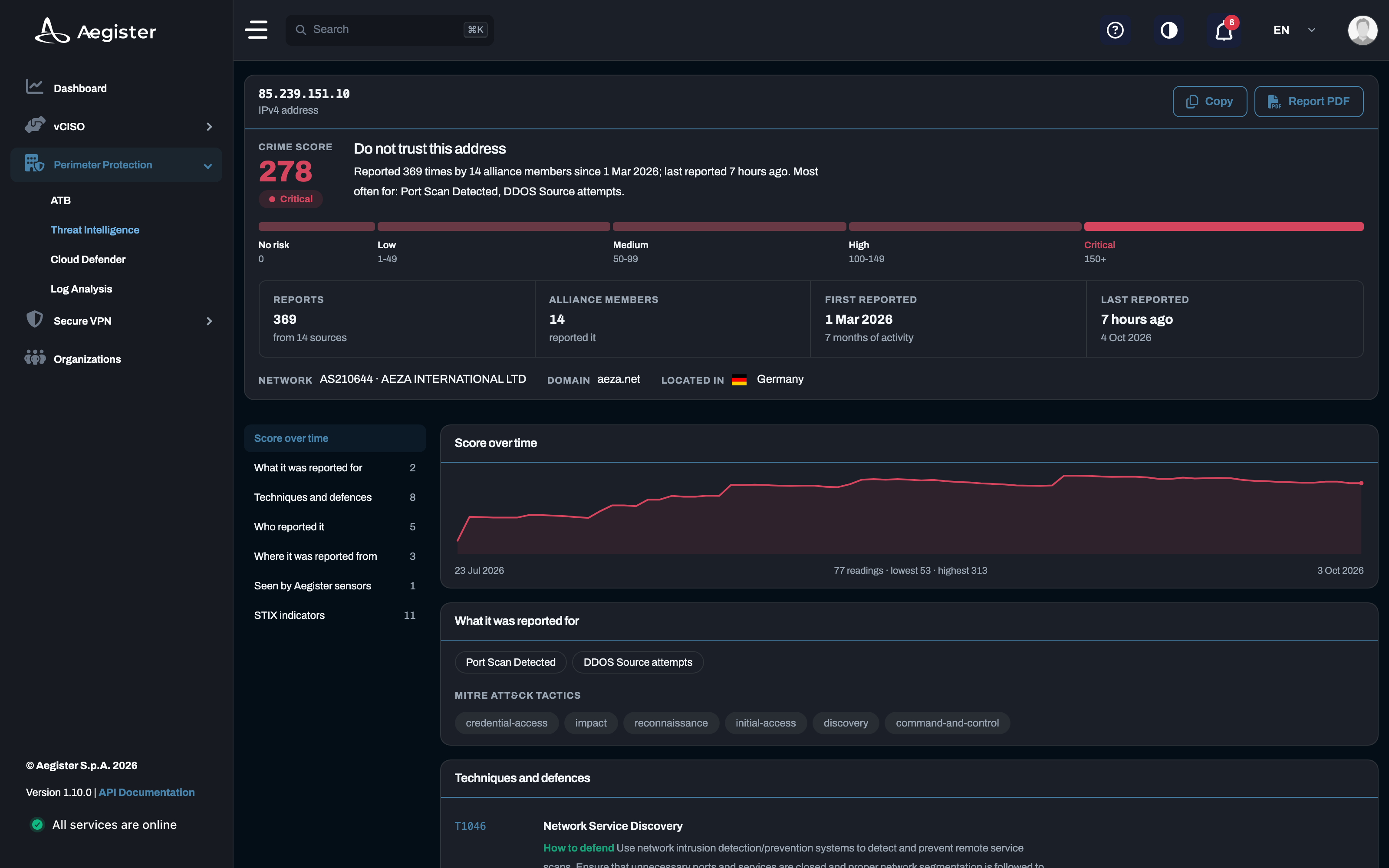
Threat intelligence insights
Guides and analysis on threat intelligence and protection against cyber threats.
 Made with AI
22 May 2025
Cyber Threats in Italy - ACN Operational Summary, April 2025
The ACN's April 2025 Operational Summary highlights a rise in ransomware and DDoS attacks in Italy, with key sectors like telecoms and public administration under threat.
 Made with AI
28 Apr 2025
Understanding Threat Intelligence: What Every Business Should Know
Explore the fundamentals of threat intelligence and its importance in proactive cybersecurity strategies.
Made with AI
12 Apr 2025
Cyber Threats 2025: The Most Common Attacks and How to Defend Against Them
An in-depth look at the most common cyber threats in 2025 from ransomware to supply chain attacks and how organizations can defend themselves using standards like the NIST CSF and ACN strategy.