



Log Analysis
A log from your firewall compared with our threat intelligence: you see what the firewall already denied and what Aegister's threat intelligence would have stopped on top.
How it works
Cyber Console reads your firewall log, up to 50,000 lines, counts the requests the firewall denied and checks the external IP addresses of the rest against the threat intelligence: those from listed addresses are the requests it would have stopped.
-
1
Your firewall's log
During the meeting with us, a log exported from your firewall is uploaded: .log, .csv, .json or .zip, up to 100 MB. The vendor is recognised automatically: FortiGate, SonicWall, Sophos, Cisco ASA, pfSense and syslog.
-
2
The comparison
On up to 50,000 lines, the action the firewall logged shows what it already denied. The external IP addresses are checked against the threat intelligence, at the crime score threshold of 175 that Threat Blocker uses by default.
-
3
The result
The requests from listed IPs that the firewall let through: those the threat intelligence would have stopped. Then where they come from and when, the hosts to export as CSV, and the recommendations.
The console in action
A tour of the console, then tasks from start to finish, on the screens you will use. Each recording is split into chapters: pick one to start from there.
During your meeting with us
Log analysis takes place in the consultation meeting, which you book directly or at the end of the Cyber Check-up: a log from your firewall is uploaded and we read the result together. The initial assessment is then completed with evidence from your network's real traffic.
The comparison replays a log already written against today's threat intelligence list: it counts requests, not attacks, and blocks nothing. On your perimeter, blocking is Threat Blocker's job.
Your data
A firewall log says a lot about your network. Here is where it stays, who sees it and what we use for the comparison.
Where the data stays
The uploaded file and the results stay on our cloud infrastructure in the Milan region, until the analysis is deleted from the list.
Who sees an analysis
Only the user who uploaded it: not colleagues in the same organization, nor other console users.
What is compared
Only the external IP addresses are used for the comparison: the log lines are not sent to the threat intelligence.
Put your firewall to the test
Start with the Cyber Check-up: at the end, book the meeting with us, where we analyse your firewall log. Or contact us directly.
Delivered through Cyber Console
Log Analysis is in the Perimeter Protection module of Cyber Console, next to Threat Blocker, Cloud Defender and Threat Intelligence: each analysis stays in the list until you delete it.
Explore the platform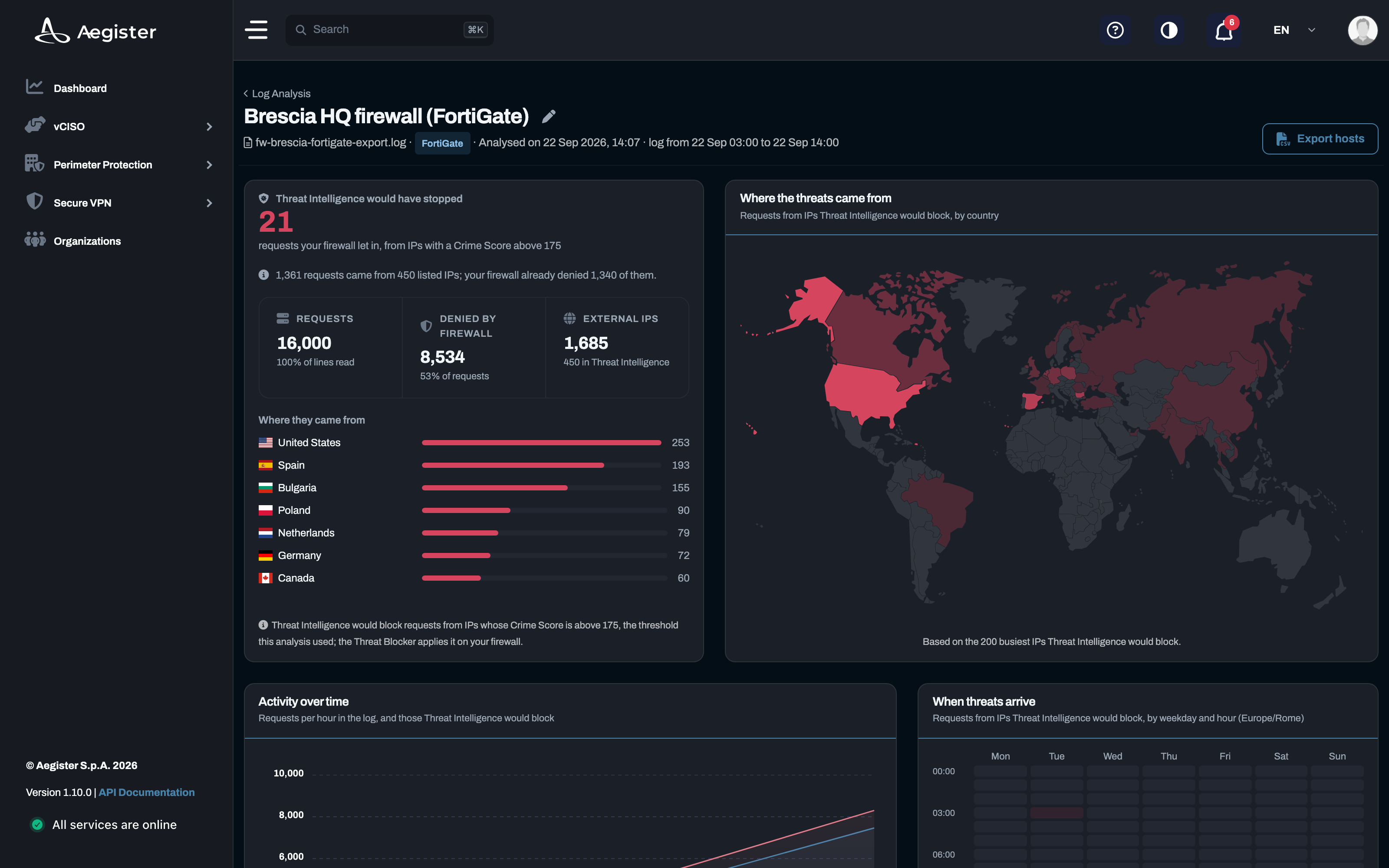
Threat intelligence insights
Guides and analysis on threat intelligence and protection against cyber threats.
 Made with AI
22 May 2025
Cyber Threats in Italy - ACN Operational Summary, April 2025
The ACN's April 2025 Operational Summary highlights a rise in ransomware and DDoS attacks in Italy, with key sectors like telecoms and public administration under threat.
 Made with AI
28 Apr 2025
Understanding Threat Intelligence: What Every Business Should Know
Explore the fundamentals of threat intelligence and its importance in proactive cybersecurity strategies.
Made with AI
12 Apr 2025
Cyber Threats 2025: The Most Common Attacks and How to Defend Against Them
An in-depth look at the most common cyber threats in 2025 from ransomware to supply chain attacks and how organizations can defend themselves using standards like the NIST CSF and ACN strategy.